I've been working on a video player, so here is a sneak preview!
Right now there are two visual effects, blur and light. I',m planning on extend the visuals along the way.
Subscribe To the Rob Blog

 Posts
All Comments
Posts
All Comments
Wednesday, February 28, 2007


Loading 3D animations
Check this amazing example of how to load a collada animation into Papervision 3D.
Tim Knip has made some great proggress in bone and skeleton animations.

The collada-file is around 5 megs, so please be patient whilst loading
Parsing all keyframes is rather cpu-intensive, after file is loaded yoy have to wait another 20 secs or so.... you may encounter the infamous script-timeout alert of the flash player...
Tim Knip has made some great proggress in bone and skeleton animations.
The collada-file is around 5 megs, so please be patient whilst loading
Parsing all keyframes is rather cpu-intensive, after file is loaded yoy have to wait another 20 secs or so.... you may encounter the infamous script-timeout alert of the flash player...
Tuesday, February 27, 2007
So you wanna get started with PV3D?

Blitz Ageny wrote a nice tutorial about how to get started with Papervision 3D.
The article explains the first step in exporting your 3d model and how to handle textures for collada export.
http://labs.blitzagency.com/?p=93
Monday, February 26, 2007
Papervision3D - Phong shading
The PV3D engine gets more and more advanced, now with Phong shading!
Check this cool exeample:

Check this cool exeample:
Papervision3D - Video texture!
Those guys that are working in the Papervision3D collaboration are really amazing!
Here is a really cool 3D video example of what you can do with PV3D!

The man behind this example is Paul Spitzer.
A Layman's Guide to Flash Video Conversion
From time to time most (flash)developers need to handle web-video. If you don't have the Flash IDE to convert the movie files to .FLV (flash video) you will need a thrd party software.

I have used FFMPEG for a few years and I must say that it totally rocks and there are soo many developers that are most gratefull for this FREE program.
Alx Klive, has written a great guide about converting movies to .FLV using FFMpeg.
http://www.worldtv.com/blog/guides_tutorials/flv_converter.php/
I have used FFMPEG for a few years and I must say that it totally rocks and there are soo many developers that are most gratefull for this FREE program.
Alx Klive, has written a great guide about converting movies to .FLV using FFMpeg.
http://www.worldtv.com/blog/guides_tutorials/flv_converter.php/
Thursday, February 16, 2006
Using Flash, WebService and Client Cookies

In a recent project i converted a .NET/Html login function to a Flash 8 login page.
My Flash first used the WebService and PendingCall to cummicate with the .NET webservice.
It all worked fine, except the fact that the login function uses a client cookie for authentication :P
As I found out, if you set a client cookie in a webservice it can't be accesible from the client.
I did not find any standard way to solve this yet, so i threw the webservice in the "thrash" and made a regular aspx page and used the LoadVars object.
If anyone have a smooth example to solve this please let us know =)
Tuesday, February 14, 2006
Save bitmap from flash
Using .NET/C# to generate bitmap from Flash 8
*update*
2006-06-20. I added a progress bar to make it more clear what is happening.
I have been searching for cool ways to use flash for creating gallery functions since it's both cool and easy to make great functions. And now when we can generate files on disk it is really usefull!
There are many examples around for this but I did not really find suitable code for me, using .Net/C#, so after messing around a bit i put together a nice solution using a .NET Web service. Please be patient, it will take a few seconds to generate the pixel array and send it to the web service.
Check it out:
The generated image will show in a new window.
Flash
function Generate(obj:MovieClip):Void
{
var pixelarr:Array = new Array()
var bmp:BitmapData = new BitmapData(obj._width, obj._height,false,0xffffff);
var myMatrix:Matrix = new Matrix();
//No positioning
myMatrix.translate(0, 0);
bmp.draw(obj.Picture,myMatrix);
var w:Number = bmp.width;
var h:Number = bmp.height;
for(var a=0; a ‹ h; a++)
{
for(var b=0; b‹w; b++)
{
pixelarr.push(bmp.getPixel32(b, a));
}
}
var wsdlURI = "http://www.2cool2care.com/flash/Service.asmx";
var myWebService:WebService = new mx.services.WebService(wsdlURI+"?WSDL");
var callback1:PendingCall = myWebService.SaveImage(pixelarr.toString(),h,w);
callback1.onResult = function(result)
{
//result is the file name
if(result)
{
getURL("http://www.2cool2care.com/flash/"+result,"_blank");
trace(result);
}
}
callback1.onFault = function(fault)
{
trace("Err: "+fault.faultstring)
}
}
C#
[WebMethod]
public string SaveImage(string Pixels,int Height, int Width)
{
//Create pixel array
String[] PxArr = Pixels.Split(',');
Bitmap MyImage = new Bitmap(Width, Height);
Graphics Gfx = Graphics.FromImage(MyImage);
Gfx.DrawRectangle(new Pen(Color.Red), new Rectangle(0, 0, Width, Height));
int k = 0;
//Loop and paint pixels
for (int i = 0; i ‹ Height; i++)
{
for (int j = 0; j ‹ Width; j++)
{
MyImage.SetPixel(j, i, Color.FromArgb(Convert.ToInt32(PxArr[k])));
k++;
}
}
//Randomize filename and save
Random RandomClass = new Random();
String Filename = RandomClass.Next().ToString() + ".png";
MyImage.Save(Server.MapPath(Filename), System.Drawing.Imaging.ImageFormat.Png);
return Filename;
}
I Hope someone finds this useful!
Take care,
Rob
*update*
2006-06-20. I added a progress bar to make it more clear what is happening.
I have been searching for cool ways to use flash for creating gallery functions since it's both cool and easy to make great functions. And now when we can generate files on disk it is really usefull!
There are many examples around for this but I did not really find suitable code for me, using .Net/C#, so after messing around a bit i put together a nice solution using a .NET Web service. Please be patient, it will take a few seconds to generate the pixel array and send it to the web service.
Check it out:
The generated image will show in a new window.
Flash
function Generate(obj:MovieClip):Void
{
var pixelarr:Array = new Array()
var bmp:BitmapData = new BitmapData(obj._width, obj._height,false,0xffffff);
var myMatrix:Matrix = new Matrix();
//No positioning
myMatrix.translate(0, 0);
bmp.draw(obj.Picture,myMatrix);
var w:Number = bmp.width;
var h:Number = bmp.height;
for(var a=0; a ‹ h; a++)
{
for(var b=0; b‹w; b++)
{
pixelarr.push(bmp.getPixel32(b, a));
}
}
var wsdlURI = "http://www.2cool2care.com/flash/Service.asmx";
var myWebService:WebService = new mx.services.WebService(wsdlURI+"?WSDL");
var callback1:PendingCall = myWebService.SaveImage(pixelarr.toString(),h,w);
callback1.onResult = function(result)
{
//result is the file name
if(result)
{
getURL("http://www.2cool2care.com/flash/"+result,"_blank");
trace(result);
}
}
callback1.onFault = function(fault)
{
trace("Err: "+fault.faultstring)
}
}
C#
[WebMethod]
public string SaveImage(string Pixels,int Height, int Width)
{
//Create pixel array
String[] PxArr = Pixels.Split(',');
Bitmap MyImage = new Bitmap(Width, Height);
Graphics Gfx = Graphics.FromImage(MyImage);
Gfx.DrawRectangle(new Pen(Color.Red), new Rectangle(0, 0, Width, Height));
int k = 0;
//Loop and paint pixels
for (int i = 0; i ‹ Height; i++)
{
for (int j = 0; j ‹ Width; j++)
{
MyImage.SetPixel(j, i, Color.FromArgb(Convert.ToInt32(PxArr[k])));
k++;
}
}
//Randomize filename and save
Random RandomClass = new Random();
String Filename = RandomClass.Next().ToString() + ".png";
MyImage.Save(Server.MapPath(Filename), System.Drawing.Imaging.ImageFormat.Png);
return Filename;
}
I Hope someone finds this useful!
Take care,
Rob
Saturday, February 11, 2006
Welcome!
Hi there!
Pretty cool that you found my bog, since it does not really exists.. that's right, i'm writing the first post right this second :)
Nevermind, what the first message really is about is internet radio.
To be more specific; Proton Radio.
These guys are streaming electronica 24/7, and sometimes it is totally awesome. Cool beats, baselines are mixed with well known songs such as Sweet dreams (yes, Eurythmics), and other classic tracs. I really reccomend!
*please note that some times the music suck a bit, but when you hear these remixes it's all worth it!*
Take care,
Rob
Pretty cool that you found my bog, since it does not really exists.. that's right, i'm writing the first post right this second :)
Nevermind, what the first message really is about is internet radio.
To be more specific; Proton Radio.
These guys are streaming electronica 24/7, and sometimes it is totally awesome. Cool beats, baselines are mixed with well known songs such as Sweet dreams (yes, Eurythmics), and other classic tracs. I really reccomend!
*please note that some times the music suck a bit, but when you hear these remixes it's all worth it!*
Take care,
Rob
Monday, November 24, 2003
Directory Picker Pro in C#
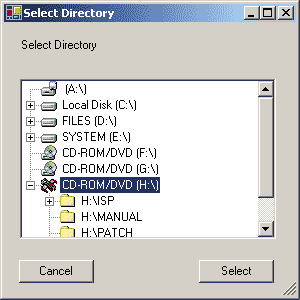
In my latest project I needed a dialog for picking a directory. I searched through the web, but found nothing that looked nice. First of all I wanted a TreeView for display, and I wanted to view all system drives (with correct names and icons).
How to use:
DirPicker DP = new DirPicker();
DP.ShowDialog();
if(DP.Result==DirectoryPickerResponse.Ok)
{
MessageBox.Show("Ok: "+ DP.SelectedDirectory);
}
else
{
MessageBox.Show("Cancel!");
}
Simple huh?
Go to the url above for source code.
Wednesday, September 03, 2003
Error Logging in ASP.NET
All coders are quite familiar with error messages. They are quite handy when developing stuff but you dont want them around after the release of your system and the users dont really think they are too funny.
So, how can we get rid of these ugly messages and still get nice information when your functions break down? I have written some code (with some inspiration from other error logging examples) that provide your system with some nice features:
- On error, it redirects the user to a page that in English explains that an error has occurred.
- You can set the object to either send an email or write in the EventLog, or both.
- All the browser information is included in the email for support help.
- It can also present an Alert message to the user
http://www.c-sharpcorner.com/UploadFile/pohlrobert/ErrorLoggingInASPNet11142005060841AM/ErrorLoggingInASPNet.aspx
Subscribe to:
Posts (Atom)